> For the complete documentation index, see [llms.txt](https://help.sbtinstruments.com/llms.txt). Markdown versions of documentation pages are available by appending `.md` to page URLs; this page is available as [Markdown](https://help.sbtinstruments.com/advanced/advanced-skill-level-vs-advanced-feature.md).
# What requires a custom solution
Anything advanced, whether a skill level or a feature category, needs a custom solution. Here is the rule, and the difference between the two.
## The two axes
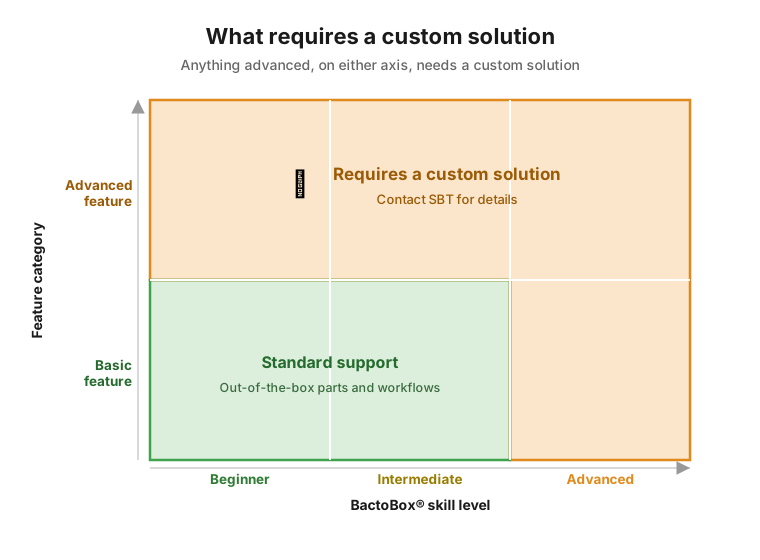
Put skill level on one axis and feature category on the other. A simple rule appears: anything advanced, on either axis, needs a custom solution.
Anything in the advanced skill level or the advanced feature category needs a custom solution.
* **Standard support.** Basic features at the beginner or intermediate skill level. This is the out-of-the-box path: standard parts, standard workflows, fully covered by the help center and our support team.
* **Requires a custom solution.** Anything that is advanced, whether by skill level or by feature category. Here the standard support ends and you need our specialist team instead.
## Advanced skill level vs. advanced feature
The word "advanced" shows up in two different ways across this help center. They are easy to mix up, so here is the difference.
* An **advanced skill level** describes a *task*. It tells you how much skill the task assumes. It is the top rung of the [BactoBox® skill levels](/advanced/bactobox-skill-levels.md), above no skill requirement, beginner, and intermediate.
* An **advanced feature** describes a *capability*. It is something BactoBox® can do that goes beyond standard, everyday use. You will spot it by the advanced feature 🧩 callout on the page.
One is about how hard something is to do. The other is about what kind of capability you are reaching for. A task can be advanced in skill, advanced in feature, or both.
## Why both lead to a custom solution
An advanced feature sits outside everyday use. So we tune it to your case rather than ship a one-size-fits-all guide. An advanced-skill task usually means a non-standard sample or method. That needs the same hands-on, case-by-case support. Either way, the answer is the same: a [custom solution](/advanced/what-is-a-custom-solution.md).
{% hint style="info" %}
This is an advanced feature. We only support advanced features through a *custom solution*. Contact SBT for details.
{% endhint %}
---
# Agent Instructions
This documentation is published with GitBook. GitBook is the documentation platform designed so that both humans and AI agents can read, navigate, and reason over technical content effectively. Learn more at gitbook.com.
## Querying This Documentation
If you need additional information that is not directly available in this page, you can query the documentation dynamically by asking a question.
Perform an HTTP GET request on the current page URL with the `ask` query parameter, and the optional `goal` query parameter:
```
GET https://help.sbtinstruments.com/advanced/advanced-skill-level-vs-advanced-feature.md?ask=&goal=
```
`ask` is the immediate question: it should be specific, self-contained, and written in natural language.
`goal` is optional and describes the broader end goal you are ultimately trying to accomplish on behalf of the user. GitBook uses it to tailor the answer towards what is most useful for that goal.
The response will contain a direct answer to the question and relevant excerpts and sources from the documentation.
Use this mechanism when the answer is not explicitly present in the current page, you need clarification or additional context, or you want to retrieve related documentation sections.