> For the complete documentation index, see [llms.txt](https://help.sbtinstruments.com/llms.txt). Markdown versions of documentation pages are available by appending `.md` to page URLs; this page is available as [Markdown](https://help.sbtinstruments.com/advanced/measurements-explained/gating.md).

# Gating

<figure><img src="/files/MqlmZFro95h4QxjpIEVG" alt=""><figcaption></figcaption></figure>

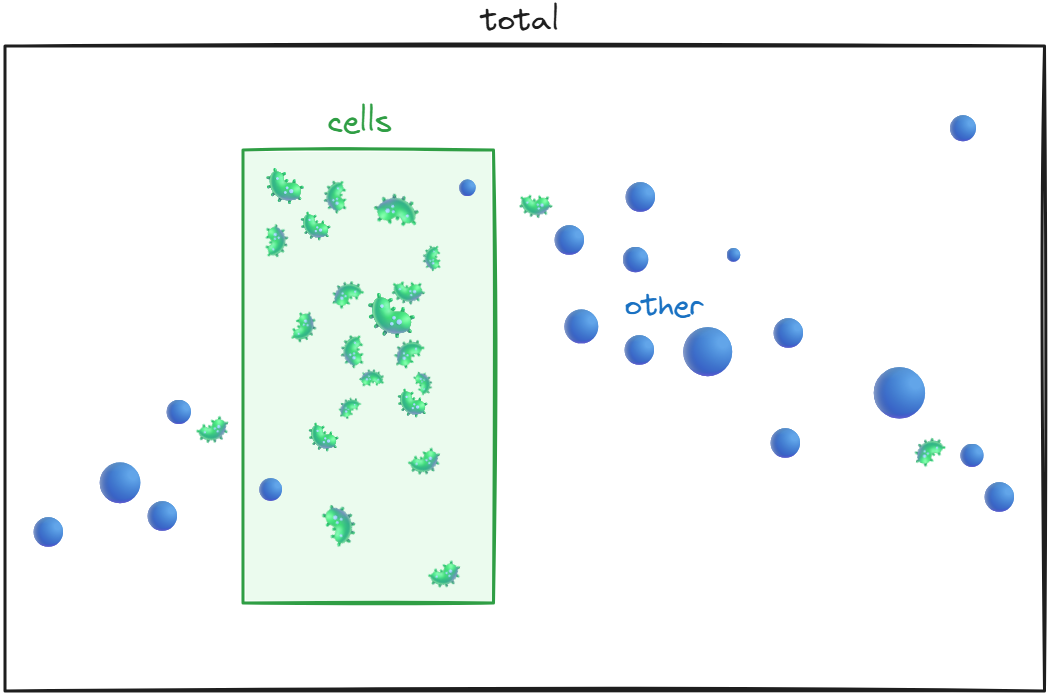
BactoBox® counts and classifies individual particles in your sample vial. Gating creates two categories: *other* and *cells*. Together, *other* and *cells* give *total*. On the *Results* screen (see [https://app.gitbook.com/s/1GbcuPi5f9BbK7GoqDt1/user-interface](https://app.gitbook.com/s/1GbcuPi5f9BbK7GoqDt1/user-interface "mention")), you see *cells/mL* and *total/mL*.

We do not show *other/mL* on the *Results* screen. You find *other/mL* in *summary.csv* (see [https://app.gitbook.com/s/1GbcuPi5f9BbK7GoqDt1/file-formats/download-your-data](https://app.gitbook.com/s/1GbcuPi5f9BbK7GoqDt1/file-formats/download-your-data "mention")).

{% hint style="info" %}

## Gating determines the category names

The category names (e.g., *cells* and *total*) follow the gating. In some gating settings, the category names are *intact cells*, *custom cells*, and *total particles*.
{% endhint %}

## Introduction to gating

Flow cytometers generally require gating for each individually performed measurement. The key operating principle of BactoBox is that Gating determines what BactoBox® classifies as *cells*. The default gating settings depend on your device configuration, but you can always change them. Careful consideration of your gating settings is key to gaining optimal results with BactoBox®.

BactoBox® detects and counts all objects in your sample within the size range of approximately 0.5–5 µm. As each object is detected, BactoBox® classifies it instantly based on your applied gating settings.

The full set of detected objects is called your total/mL concentration. From that total, some objects will be classified as cells/mL, while the rest are classified as other/mL.

<figure><img src="/files/n9inYSqHFDbPIkqxsBlm" alt=""><figcaption><p>BactoBox® counts individual objects (bacteria and blue dots) in your sample vial. BactoBox® classifies some objects as <em>cells</em> (everything in the green rectangle) based on your applied gating. Conceptually, the gating is like the green rectangle in this diagram. Note that, like in real life, the gating is not perfect. A couple of the blue dots (particles) are inside the green rectangle (counted as <em>cells</em>). Likewise, a couple of bacteria are outside green rectangle (counted as <em>other</em>).</p></figcaption></figure>

## Appropriate gating strategies

Selecting an appropriate gating strategy means deciding what you want to achieve with your use of BactoBox®. It is a high-level choice based on your measurement goals. The right strategy depends on your specific use case, and each approach involves trade-offs. You are always welcome to contact us to discuss which option best fits your needs.

There are three overall gating strategies when using BactoBox®:

1. Total cell enumeration.
2. Sensitive detection of cell death onset.
3. Approximate live/dead quantification.

Below, we outline each approach and when it is most appropriate, and we introduce special cases.

{% hint style="info" %}
A *gating strategy* is a high-level decision about what you want to achieve with your use of BactoBox®. It reflects your measurement goal, such as tracking total cell growth or detecting when cell death begins.

A *gating setting* is the specific configuration that defines which objects in your sample are classified as *cells* and which are classified as *other*. Together, *cells* and *other* make up the *total* signal in your measurement.
{% endhint %}

### Total cell enumeration

This strategy counts all intact bacterial cells in your sample, regardless of whether they are viable. It is usually the best choice for batch fermentations and other straightforward cultivation workflows.

In batch fermentations, nearly all cells are viable until you reach the death phase. Trying to split live and dead cells in this context adds complexity but rarely offers meaningful insight. In contrast, total counts align well with CFU measurements during exponential and stationary phases.

When you use this strategy for batch fermentations, BactoBox® provides quantified concentrations of bacterial cells. These measurements are consistent and robust across different growth phases, and they offer much greater accuracy than OD₆₀₀, which is affected by changes in cell morphology, pigment production, and media components. While BactoBox® does not count colony-forming units, the results strongly correlate with CFU values during exponential and stationary phases. This makes it possible to track growth curves and concentration plateaus with confidence—without the need for calibration or reference curves.

{% hint style="success" %}
The total cell enumeration gating strategy typically produces settings that work well across a wide range of bacterial species reducing the need for method development.
{% endhint %}

{% hint style="warning" %}
To get reliable results with this strategy, you need to check whether your sample medium introduces background signal in the same region as bacterial cells. This should be evaluated and, if necessary, corrected for when setting up the gating setting.
{% endhint %}

<figure><img src="/files/znddlrRMFwziXskNnvrF" alt=""><figcaption><p>Total cell enumeration focuses exclusively on counting intact bacterial cells—both viable cells (green) and non-viable cells (red)—while excluding other particles and debris (gray particles) from the analysis.</p></figcaption></figure>

### Approximate live/dead quantification

If your sample is expected to contain both viable and non-viable cells, such as during downstream processing and formulation, you can apply a gating strategy that estimates the viable and non-viable populations. We do not recommend this use of BactoBox® without extensive tailoring of the gating setting.

This strategy builds the gate from control samples: typically an exponentially growing culture as the live control and a heat-inactivated culture as the dead control. We look for a measurable difference in membrane integrity between the two, use it as a proxy for viability, and set the gate on that difference. Because viable and dead cells often have overlapping dielectric properties, the classification will never be perfect.

The gate is only as good as its controls, and it is sensitive. A change of medium, strain, or growth condition can shift the populations and make the classification wrong. That sensitivity is why this strategy needs case-by-case tailoring and is not a routine approach.

{% hint style="danger" %}
The approximate live/dead gating strategy is highly species-dependent, and gating settings must be tailored accordingly.
{% endhint %}

This approach can show you trends and relative changes in cell health, but you should be careful with treating the numbers as exact unless extensive validation is performed. Note that many bacteria lose culturability before their membranes are compromised, so CFU counts may drop earlier than intact cell counts in BactoBox®.

{% hint style="info" %}
We don't automatically recommend using the [#approximate-live-dead-quantification](#approximate-live-dead-quantification "mention") strategy for fermentation process development. For batch fermentation work, we recommend using the [#total-cell-enumeration](#total-cell-enumeration "mention") strategy. For fed-batch fermentation work, it is relevant to use [#total-cell-enumeration](#total-cell-enumeration "mention") to monitor your seed trains, and either [#approximate-live-dead-quantification](#approximate-live-dead-quantification "mention") or sensitive detection of cell death onset to monitor your main fermenter.
{% endhint %}

<figure><img src="/files/VP5UzA8jP1HUocDzd8On" alt=""><figcaption><p>The approximate live/dead quantification strategy seeks the best compromise for distinguishing live and dead cells. In practice, the gating settings define a region that includes mostly viable cells (green) and only a small fraction of non-viable cells (red), which are counted in the reported cells/mL value. Some viable cells and most non-viable cells fall outside this region and are therefore excluded from the result, along with other particles and debris (gray).</p></figcaption></figure>

### Special cases

It is also possible to develop gating settings to detect special objects such as endospores. Please contact us to discuss this topic in further detail.

## Default gating settings on BactoBox®

When you press the <kbd><mark style="background-color:purple;">Measure<mark style="background-color:purple;"></kbd> button on BactoBox® to run a sample, the applied gating setting depends on your product version.

Products purchased before September 2024 shipped with a gating setting that follows the [#approximate-live-dead-quantification](#approximate-live-dead-quantification "mention") strategy, named *BacTotal-v2024-02*. We built it from a dataset of six bacterial species, each measured as an exponentially growing control and a heat-inactivated control, and set the gate on the difference between the two. In real use this did not hold up: the classification was too sensitive to species, medium, and growth conditions to be reliable as a fixed default. We no longer ship it as the default, but it remains on the device because some legacy users have validated it for their own process. If your device still uses it and you have not validated it for your samples, contact us about moving to the current default.

Products purchased after September 2024 employ a gating setting that follows the [#total-cell-enumeration](#total-cell-enumeration "mention") strategy, named *BacTotal-v2024-10*. The approach is designed to work across a wide range of bacterial species, making it more robust for general use. However, it is important to validate that your specific sample matrix is compatible—in particular, that your medium, when diluted into BactoBox® diluent, does not generate false-positive counts.

{% hint style="info" %}
The gating setting used for each measurement is always displayed on the 'Results' screen and recorded in the *summary.csv* file for reference.
{% endhint %}

## How to develop a gating setting

We are currently developing training materials on how to create an appropriate gating setting based on your chosen strategy. Until these materials are finalized, please feel free to contact us for personalized support.


---

# Agent Instructions
This documentation is published with GitBook. GitBook is the documentation platform designed so that both humans and AI agents can read, navigate, and reason over technical content effectively. Learn more at gitbook.com.

## Querying This Documentation
If you need additional information that is not directly available in this page, you can query the documentation dynamically by asking a question.

Perform an HTTP GET request on the current page URL with the `ask` query parameter:

```
GET https://help.sbtinstruments.com/advanced/measurements-explained/gating.md?ask=<question>
```

The question should be specific, self-contained, and written in natural language.
The response will contain a direct answer to the question and relevant excerpts and sources from the documentation.

Use this mechanism when the answer is not explicitly present in the current page, you need clarification or additional context, or you want to retrieve related documentation sections.
