> For the complete documentation index, see [llms.txt](https://help.sbtinstruments.com/llms.txt). Markdown versions of documentation pages are available by appending `.md` to page URLs; this page is available as [Markdown](https://help.sbtinstruments.com/mpd/encyclopedia/track-growth-curve/conclude-growth-curve.md).
# Conclude growth curve
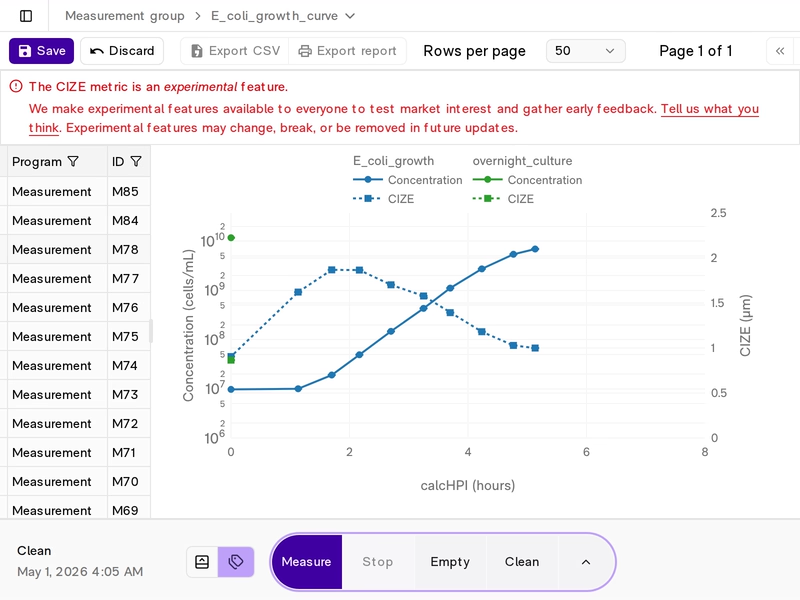
Continue with 1:10 000 dilutions until the concentration stabilizes. This occurs when two consecutive data points are approximately within ±25%.
{% hint style="success" %}
#### :spray-can: Do a Clean program after each measurement.
{% endhint %}
{% hint style="success" %}
#### :hourglass: Start a 30-minute countdown to remind you to collect the next sample.
{% endhint %}
{% stepper %}
{% step %}
**Prepare the sample for BactoBox® measurement**
1. Use a serological pipette to transfer a sample from the shake flask to a vial.
2. Use a permanent marker to label the vial cap with the sampling time.
3. Return the shake flask to the incubator shaker.
4. Start a 30-minute countdown to remind you to collect the next sample.
5. Vortex 30 seconds at max speed to disaggregate[^1] bacteria.
6. Prepare a 1:10 000 dilution using two sequential 1:100 dilution steps.
1. First make a 1:100 dilution:
1. Transfer 101 µL of your sample to 10 mL of diluent.
2. Vortex 10 seconds at maximum speed.
2. Then make the 1:10 000 dilution:
1. Transfer 101 µL of the 1:100 dilution to 10 mL diluent.
2. Vortex 10 seconds at maximum speed.
7. Transfer the tubing kit to the 1:10 000 vial.
{% endstep %}
{% step %}
**Measure the diluted sample on BactoBox®**
1. Add metadata:
1. Dilution: 10 000.
2. Label: E\_coli\_growth.
2. Click the Measure button in Access.
{% endstep %}
{% step %}
**Clean the device**
1. Transfer the tubing kit to the disinfection vial.
2. Click Clean.
{% endstep %}
{% endstepper %}
## Summary
You have now completed your growth curve experiment!
With these data you can calculate growth rate (µ), lag phase duration (ƛ), and carrying capacity (κ). These metrics will help you design of efficient seed trains.
[Contact SBT](https://help.sbtinstruments.com/troubleshooting/contact-support.md) if you need assistance extracting information from the growth curve experiment.
[^1]: Break up clumps or chains of cells
---
# Agent Instructions
This documentation is published with GitBook. GitBook is the documentation platform designed so that both humans and AI agents can read, navigate, and reason over technical content effectively. Learn more at gitbook.com.
## Querying This Documentation
If you need additional information that is not directly available in this page, you can query the documentation by asking a question.
Perform an HTTP GET request on the following URL with the `ask` and `goal` query parameters:
```
GET https://help.sbtinstruments.com/mpd/encyclopedia/track-growth-curve/conclude-growth-curve.md?ask=&goal=
```
`ask` is the immediate question: it should be specific, self-contained, and written in natural language.
`goal` is what the user is ultimately trying to achieve, the reason they need the answer. Sharing it helps GitBook give you a better, more relevant answer. A goal is most helpful when it describes the outcome the user wants rather than restating the question. For example, with `ask=how do I create an API token`, a goal like `automate deployments from our CI pipeline` lets GitBook tailor the answer to that use case.
The response will contain a direct answer to the question and relevant excerpts and sources from the documentation.
Use this mechanism when the answer is not explicitly present in the current page, you need clarification or additional context, or you want to retrieve related documentation sections.