> For the complete documentation index, see [llms.txt](https://help.sbtinstruments.com/llms.txt). Markdown versions of documentation pages are available by appending `.md` to page URLs; this page is available as [Markdown](https://help.sbtinstruments.com/mpd/track-growth-curve.md).

# Track a growth curve

Capture your data for every workflow. Follow one culture from inoculation until your process ends, while Access plots the curve.

With BactoBox® and [Access](https://help.sbtinstruments.com/everyday-use/do-measurements-in-access.md), you count the cells in each sample and the curve builds on screen while the experiment runs. Every workflow in this space builds on it.

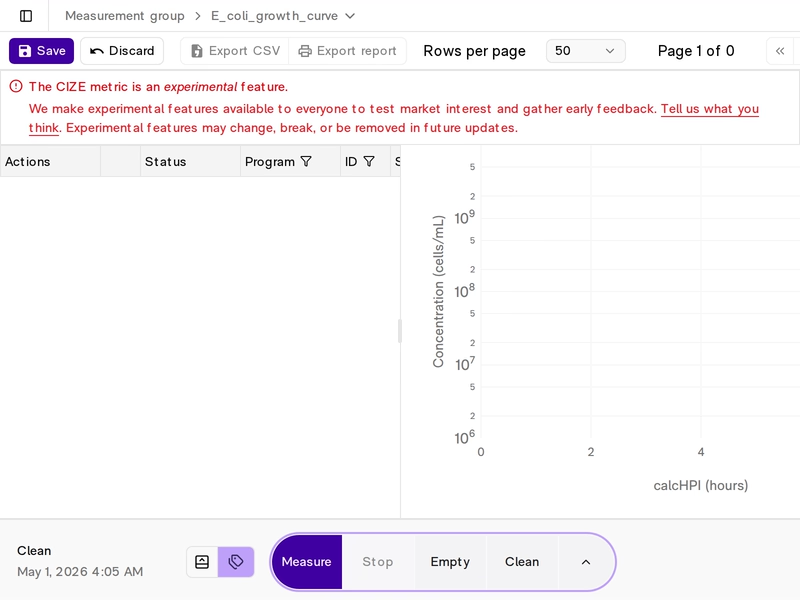
<div data-with-frame="true"><figure><img src="https://142487182-files.gitbook.io/~/files/v0/b/gitbook-x-prod.appspot.com/o/spaces%2FseAjVXi9YrPNSfdp1OXS%2Fuploads%2Fgit-blob-6949a35f0137e8713fdf20dafa4e52fab9d4b5a5%2FGrowth_curve_full.avif?alt=media" alt="A full growth curve in Access, with cells/mL and CIZE plotted against time."><figcaption><p>Where you end up. A full growth curve, plotted live in Access.</p></figcaption></figure></div>

{% hint style="success" icon="chalkboard-user" %}

## Sample preparation for BactoBox® analyses

BactoBox® gives you reliable results when you have a single-cell suspension and dilute into the working range. Read [Before you measure](https://help.sbtinstruments.com/everyday-use/before-you-measure.md) to avoid the common pitfalls.
{% endhint %}

## How Access builds the curve

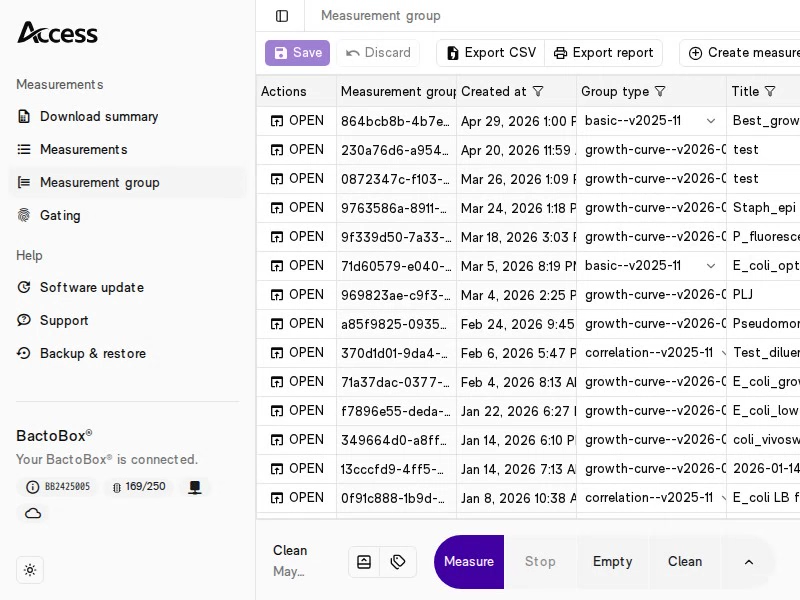
[Connect to Access](https://help.sbtinstruments.com/more/software/connect-to-access.md). Create a measurement group of the type *Growth curve*, and open it. Every measurement you start now joins the group. See [Create and open measurement groups](https://help.sbtinstruments.com/more/software/create-and-open-measurement-groups.md).

<div data-with-frame="true"><figure><img src="https://142487182-files.gitbook.io/~/files/v0/b/gitbook-x-prod.appspot.com/o/spaces%2FseAjVXi9YrPNSfdp1OXS%2Fuploads%2Fgit-blob-821f7c540d21dc1ed4675e9d5cc893c6c3007cb7%2FGrowth_curve_create.avif?alt=media" alt="Creating a measurement group of the type Growth curve in Access."><figcaption><p>Create a measurement group of the type Growth curve.</p></figcaption></figure></div>

Access plots cells/mL and CIZE against time for every sample in the group. It draws one curve per label, and places each sample on the time axis by its *Sampled at* time, counted from the first sample with that label. See [Label your samples](https://help.sbtinstruments.com/more/software/label-your-samples.md) for how to fill in the fields.

<div data-with-frame="true"><figure><img src="https://142487182-files.gitbook.io/~/files/v0/b/gitbook-x-prod.appspot.com/o/spaces%2FseAjVXi9YrPNSfdp1OXS%2Fuploads%2FKkTGjckr7tm4g9VlgAmg%2Faccess-sample-fields.png?alt=media" alt="The sample fields in Access: Sampled at with a clock icon, Dilution, Label and Measurement group, above the Measure button."><figcaption><p>The fields you fill in for each sample.</p></figcaption></figure></div>

Measure the same sample more than once with the same label and the same *Sampled at* time, and Access treats the results as replicates. It plots their mean.

## Plan your sampling

Decide when to sample before you start. A few rules hold for every workflow.

* Count the seed right after you inoculate. It shows how many cells you started with, and sets time zero for the label.
* Sample every hour or every two hours while the culture grows. Choose by how fast your culture grows and how much detail your process needs.
* Sample more often around the points that matter to you, such as a transfer, an induction or the end of growth.
* Measure each sample as soon as you can, and within 20 minutes of pulling it. Then the sample still shows your culture as it was.
* In fed-batch, note the culture volume at each sample. The feed dilutes your culture, so you compare total cells, cells/mL × culture volume.

## Every sample, two steps

Repeat the two steps at each sample point until your process ends.

<figure><img src="https://142487182-files.gitbook.io/~/files/v0/b/gitbook-x-prod.appspot.com/o/spaces%2FseAjVXi9YrPNSfdp1OXS%2Fuploads%2FSYU9eoMjjY6PMbHTIzzQ%2Ftrack-growth-curve--two-steps.svg?alt=media" alt="Step 1: pull the sample, note the time, and set Sampled at to that time in Access. Step 2: run a sample, disperse, dilute, measure and clean, and enter the dilution and the label in Access. Then repeat. Each new point lands on the curve at the time you pulled the sample."><figcaption><p>Set <em>Sampled at</em> to the time you pulled the sample. The point lands on the curve at that time, however long the measurement takes.</p></figcaption></figure>

{% stepper %}
{% step %}

### Pull the sample and set *Sampled at*

Pull your sample from the flask or bioreactor, and note the time. In Access, set *Sampled at* to that time. See [Set the time you took the sample](https://help.sbtinstruments.com/more/software/label-your-samples.md#set-the-time-you-took-the-sample). Measure the sample within 20 minutes.
{% endstep %}

{% step %}

### Run a sample

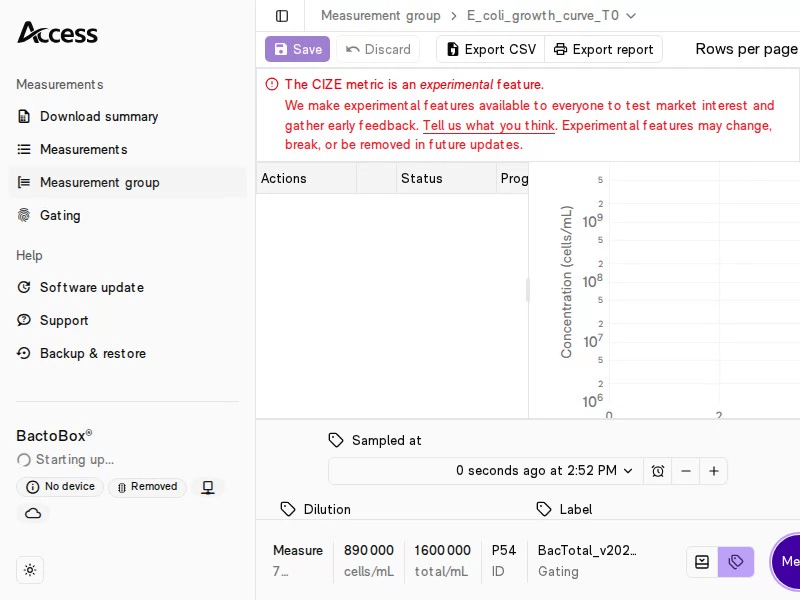
Go through the steps in [Run a sample](https://help.sbtinstruments.com/everyday-use/run-a-sample.md). Disperse the cells, dilute into the working range, measure and clean. In Access, enter the dilution factor and the label, then press <kbd><mark style="background-color:purple;">Measure<mark style="background-color:purple;"></kbd>.

About 1 × 10^6 cells/mL in the vial gives fast results. Most seeds and young cultures need 1:100. Move down the table in [Hit the right concentration](https://help.sbtinstruments.com/more/how-to-guides/hit-the-right-concentration.md) as the culture grows. Dense fed-batch cultures can reach 10^11 cells/mL and need 1:132 651, three 200 µL transfers.

<div data-with-frame="true"><figure><img src="https://142487182-files.gitbook.io/~/files/v0/b/gitbook-x-prod.appspot.com/o/spaces%2FseAjVXi9YrPNSfdp1OXS%2Fuploads%2Fgit-blob-e6c8af5c79469eda7fb9e623276375cdbdfbd130%2FT0_measure.avif?alt=media" alt="The sample fields filled in for the first sample in Access, with the Measure button."><figcaption><p>Enter the sample details and press <kbd><mark style="background-color:purple;">Measure</mark></kbd>. The curve builds point by point.</p></figcaption></figure></div>
{% endstep %}
{% endstepper %}

When your process ends, open the measurement group and download its CSV file. For what the count and cell size show about a culture, see [Why use BactoBox®](https://help.sbtinstruments.com/mpd/why-use-bactobox-r.md). For how repeatable the count and CIZE are, see [Precision and accuracy](https://help.sbtinstruments.com/technical-documentation/performance/precision-and-accuracy.md).

## Next step

Pick the workflow that matches how you run your process.

<table data-view="cards"><thead><tr><th></th><th></th><th data-hidden data-card-target data-type="content-ref"></th></tr></thead><tbody><tr><td><i class="fa-flask">:flask:</i> <strong>Batch</strong></td><td>Find when growth stops, and compare media and conditions.</td><td><a href="https://help.sbtinstruments.com/mpd/batch/find-when-growth-stops.md">Find when growth stops</a></td></tr><tr><td><i class="fa-industry">:industry:</i> <strong>Fed-batch</strong></td><td>Time the induction, compare scales, and find when to end the run.</td><td><a href="https://help.sbtinstruments.com/mpd/fed-batch/time-the-induction-on-cell-state.md">Time the induction on cell state</a></td></tr><tr><td><i class="fa-arrow-right-arrow-left">:arrow-right-arrow-left:</i> <strong>Seed train</strong></td><td>A consistent seed gives consistent growth.</td><td><a href="https://help.sbtinstruments.com/mpd/seed-train/design-the-seed-train.md">Design the seed train</a></td></tr></tbody></table>

## See it in practice

<table data-view="cards"><thead><tr><th></th><th></th><th data-hidden data-card-target data-type="content-ref"></th></tr></thead><tbody><tr><td><i class="fa-scale-unbalanced">:scale-unbalanced:</i> <strong>Check an OD600 calibration</strong></td><td>One culture, three methods.</td><td><a href="https://help.sbtinstruments.com/mpd/workflows/check-an-od600-calibration.md">Check an OD600 calibration</a></td></tr><tr><td><i class="fa-ranking-star">:ranking-star:</i> <strong>Screen growth media</strong></td><td>Four media and three glycerol levels, on OD and on cells.</td><td><a href="https://help.sbtinstruments.com/mpd/workflows/best-medium.md">Screen growth media</a></td></tr><tr><td><i class="fa-corn">:corn:</i> <strong>Identify harvest time</strong></td><td>Real-time counts show when growth stops.</td><td><a href="https://help.sbtinstruments.com/mpd/workflows/mpd1.md">Identify harvest time</a></td></tr></tbody></table>

Questions about your own process? [Contact us](https://sbtinstruments.com/contact).


---

# Agent Instructions
This documentation is published with GitBook. GitBook is the documentation platform designed so that both humans and AI agents can read, navigate, and reason over technical content effectively. Learn more at gitbook.com.

## Querying This Documentation
If you need additional information that is not directly available in this page, you can query the documentation by asking a question.

Perform an HTTP GET request on the following URL with the `ask` and `goal` query parameters:

```
GET https://help.sbtinstruments.com/mpd/track-growth-curve.md?ask=<question>&goal=<user_goal>
```

`ask` is the immediate question: it should be specific, self-contained, and written in natural language.
`goal` is what the user is ultimately trying to achieve, the reason they need the answer. Sharing it helps GitBook give you a better, more relevant answer. A goal is most helpful when it describes the outcome the user wants rather than restating the question. For example, with `ask=how do I create an API token`, a goal like `automate deployments from our CI pipeline` lets GitBook tailor the answer to that use case.

The response will contain a direct answer to the question and relevant excerpts and sources from the documentation.

Use this mechanism when the answer is not explicitly present in the current page, you need clarification or additional context, or you want to retrieve related documentation sections.