> For the complete documentation index, see [llms.txt](https://help.sbtinstruments.com/llms.txt). Markdown versions of documentation pages are available by appending `.md` to page URLs; this page is available as [Markdown](https://help.sbtinstruments.com/software/dash/menu-system.md).
# Menu system
BactoBox® comes with a menu system that lets users access extra features
## Get to the menu
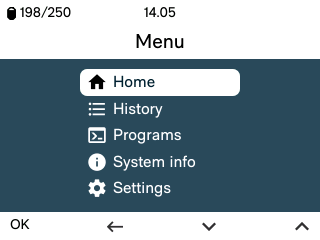
Press and hold Stop for 1 second to open the menu. The menu looks like this:
The menu screen at the root level
## Get out of the menu
Press ← until you reach the root menu. Select *Home*. Press OK to return to the home screen.
## Menu screens
In this section we explain the purpose of selected menu screens.
### History
View the results of your past measurements.
### Programs
Apart from the button programs, BactoBox® has a few specialized programs.
Click the tabs to read more about the available programs.
{% tabs fullWidth="false" %}
{% tab title="Conductivity" %}
Select *Conductivity* to run a conductivity check.
The device reports electrical conductivity (EC) in µS/cm. The value is **not** temperature-compensated.
{% endtab %}
{% tab title="Deep clean" %}
Run *Deep clean* to remove hard-to-clean deposits in the liquid path.
See [Deep clean explained](/more/how-to-guides/deep-clean-your-setup/deep-clean.md).
{% endtab %}
{% tab title="QC test" %}
See [QC test](/maintenance/qc-test.md).
{% endtab %}
{% tab title="Custom measurement" %}
Use *Custom measurement* for special gating settings (for example, endospores).
Create custom programs in BactoBox Explorer. Upload them via Access.
{% endtab %}
{% tab title="Measure with low conductivity" %}
Use *Measure with low conductivity* when you need extra contrast between intact cells and background.
The program uses 1-in-20 PBS. This can improve phase shift separation. It may reduce signal-to-noise ratio.
{% endtab %}
{% endtabs %}
{% hint style="info" %}
Press and hold Measure for 1 second from the home screen to access the *Programs* menu.
{% endhint %}
### System info
Contains network, storage, legal, and version information.
{% tabs %}
{% tab title="Network" %}
Shows the BactoBox® ID. It also shows network connectivity (mainly used by SBT service).
{% endtab %}
{% tab title="Storage" %}
Shows how much storage space is left on the device.
{% endtab %}
{% tab title="Legal info" %}
Lists software licensing information.
{% endtab %}
{% tab title="Versions" %}
Shows hardware, firmware, and software versions.
{% endtab %}
{% endtabs %}
### Time and date
It is possible to manually set time, date, and time zone.
{% tabs %}
{% tab title="Time" %}
Select *Set time*.
Use ∨∧ to change the hour. Press OK to move on.
Use ∨∧ to change minutes. Press OK to submit.
{% endtab %}
{% tab title="Date" %}
Select *Set date*.
Use ∨∧ to change the year. Press OK to move on.
Repeat for month and day.
Select *Submit*. Press OK to apply the date.
{% endtab %}
{% tab title="Time zone" %}
Select *Set time zone*.
Use ∨∧ to select a continent. Press OK.
Select an area or city. Press OK.
Select *Submit*. Press OK.
{% endtab %}
{% endtabs %}
{% hint style="info" %}
Restart the device to apply the changes.
{% endhint %}
### Service
The service menu contains maintenance features like the possibility of deleting all data if needed.
---
# Agent Instructions
This documentation is published with GitBook. GitBook is the documentation platform designed so that both humans and AI agents can read, navigate, and reason over technical content effectively. Learn more at gitbook.com.
## Querying This Documentation
If you need additional information that is not directly available in this page, you can query the documentation by asking a question.
Perform an HTTP GET request on the following URL with the `ask` and `goal` query parameters:
```
GET https://help.sbtinstruments.com/software/dash/menu-system.md?ask=&goal=
```
`ask` is the immediate question: it should be specific, self-contained, and written in natural language.
`goal` is what the user is ultimately trying to achieve, the reason they need the answer. Sharing it helps GitBook give you a better, more relevant answer. A goal is most helpful when it describes the outcome the user wants rather than restating the question. For example, with `ask=how do I create an API token`, a goal like `automate deployments from our CI pipeline` lets GitBook tailor the answer to that use case.
The response will contain a direct answer to the question and relevant excerpts and sources from the documentation.
Use this mechanism when the answer is not explicitly present in the current page, you need clarification or additional context, or you want to retrieve related documentation sections.