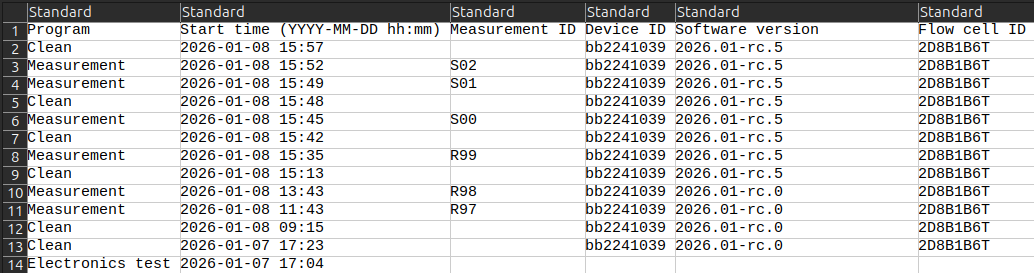
Example of a few rows and columns in a summary.csv file. Visualized in a spreadsheet editor like Microsoft Excel.
Example of a few rows and columns in a summary.csv file. Visualized in a spreadsheet editor like Microsoft Excel.
 Use Microsoft Excel to open the CSV file. Excel automatically arranges the tabular data in a spreadsheet.
The *Format as table* feature under the *Styles* pane works well for sorting data. Save the file in the XLSX format to make persistent changes.
{% endhint %}
## Rows
There is one row for each program (*Measure*, *Empty*, *Clean*, etc.) started on your BactoBox®. This reflects what you see in the:
* [History screen](/software/dash/menu-system.md#history) in the [Dash](/software/dash/user-interface.md) user interface
* Measurements page in the [Access](/software/access/access.md) user interface
We sort the rows by the *Start time* column. The newest row comes first.
## Columns
The columns include (non-exhaustive list):
Use Microsoft Excel to open the CSV file. Excel automatically arranges the tabular data in a spreadsheet.
The *Format as table* feature under the *Styles* pane works well for sorting data. Save the file in the XLSX format to make persistent changes.
{% endhint %}
## Rows
There is one row for each program (*Measure*, *Empty*, *Clean*, etc.) started on your BactoBox®. This reflects what you see in the:
* [History screen](/software/dash/menu-system.md#history) in the [Dash](/software/dash/user-interface.md) user interface
* Measurements page in the [Access](/software/access/access.md) user interface
We sort the rows by the *Start time* column. The newest row comes first.
## Columns
The columns include (non-exhaustive list):
| Column name | Description |
|---|---|
| Program | Program name. E.g., Measure, Empty, Clean, etc. |
| Start time (YYYY-MM-DD hh:mm) | Format: YYYY-MM-DD hh:mm Uses the time zone of your BactoBox®. |
| Measurement ID | Mnemonic measurement ID. E.g., A03 or F98. Rolls over at Z99 to A00. Blank for some utility programs. |
| Device ID | The unique ID of your BactoBox® device. E.g., bb2241039. |
| Software version | Version of the BactoBox® software used when the program started. E.g., 2026.01. |
| Flow cell ID | Unique ID for the flow used for the measurement. E.g., 2D8B1B6T. |
| Cells/mL | Measured cells/mL concentration. May show, e.g., "<30000" including the less-than sign. Blank for some utility programs. |
| Total/mL | Measured total/mL concentration. May show, e.g., "<30000" including the less-than sign. Blank for some utility programs. |
| Total/mL - Cells/mL | Measured other/mL concentration. May show, e.g., "<30000" including the less-than sign. Blank for some utility programs. |
| Conductivity [uS/cm] | The electrical conductivity in µS/cm of the measured sample liquid. Blank for some utility programs. |
| Errors | Error code and explanation. E.g., "1200: The conductivity is lower than 1600 uS/cm". Blank if there are no errors. |
| ECC factor | Empirical concentration correction (ECC) factor. BactoBox® adjusts the intact cell concentration based on the ECC. Part of gating settings defined the CRS file. Blank for some utility programs. |
| Classification filename | File name of the CRS file that defines the gating settings. E.g., BacTotal_v2024-02.crs.json.Blank for some utility programs. |
| Classification limits | Phase and amplitude “gates” that BactoBox® uses to classify the objects in your sample vial. Part of gating settings defined the CRS file. Blank for some utility programs. |
| Form | Row limit | Notes |
|---|---|---|
| Short | 200 | Found in the USB drive that appears when you connect your BactoBox® to your computer. |
| Long | ∞ | Download via Access. |