> For the complete documentation index, see [llms.txt](https://help.sbtinstruments.com/llms.txt). Markdown versions of documentation pages are available by appending `.md` to page URLs; this page is available as [Markdown](https://help.sbtinstruments.com/troubleshooting/not-in-the-new-structure/errors-about-conductivity/conductivity-too-low.md).

# Conductivity too low

## Introduction

The low conductivity errors (error 1200 and 1206) typically occur if the system is clogged or the flow path is not sufficiently airtight. These error may also result from an incorrect composition of the diluent.

## Step by step

{% stepper %}
{% step %}

#### Check that everything is correctly in place

Ensure that the tubing kit and external filter is tightly connected to your BactoBox®.

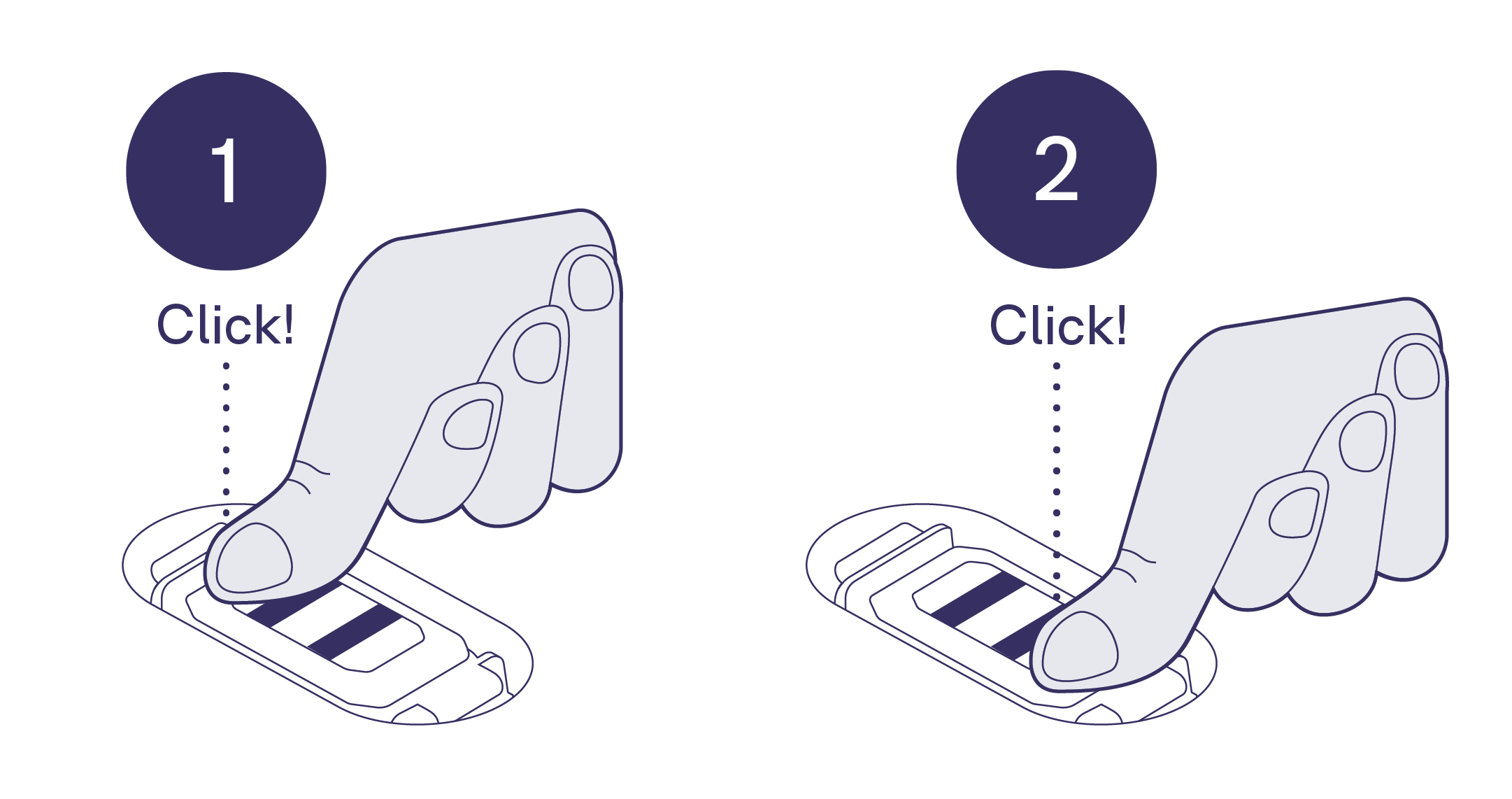
Press down on the flow cell to ensure that is properly in place. Press down *hard* to be sure.

<figure><img src="https://1589625940-files.gitbook.io/~/files/v0/b/gitbook-x-prod.appspot.com/o/spaces%2FQorx08wID6YNpw8pEV0j%2Fuploads%2Fgit-blob-46757932fdb10c0a43cab682520f18830fad3231%2Fflow-cell--simple-outline--click-into-place.png?alt=media" alt="" width="375"><figcaption><p>You hear two clicks during <a href="/getting-started/installation/install-flow-cell.md">flow cell installation</a>. Afterwards, it should just feel slightly springy when you press the center part of the flow cell (no more click sounds).</p></figcaption></figure>
{% endstep %}

{% step %}

#### Replace the external filter

Replace the [external filter](/item-register/individual-items/external-filter.md). See [Install tubing kit](/getting-started/installation/install-tubing-kit.md) for details.

**Perform a** [**QC test**](/maintenance/qc-test.md) **again** with your new external filter in place and a [new QC vial](/maintenance/qc-test/make-qc-vial.md).
{% endstep %}

{% step %}

#### Double check how you prepare your sample

Double-check how [you prepare your sample](/advanced/advanced-sample-preparation/prepare-your-sample.md) for use with BactoBox®. Especially the part about how you [get the conductivity into the <code class="expression">space.vars.BB\_LIMIT\_EC</code> range](/advanced/advanced-sample-preparation/hit-the-right-conductivity.md).
{% endstep %}
{% endstepper %}

## Tried all of the above

Did you try all of the above and nothing helped?

This is a hardware issue with your BactoBox® setup. [Contact our support team](broken://pages/l8Gc9LJGCvsSLOjzDNGF) to discuss the matter further. Make sure to mention it if you found:

* A leak inside the flow cell compartment
* Sign of corrosion or deterioration inside the flow cell department
* Broken or loose inlet/outlet (where you connect the tubing kit to your BactoBox®)
* Rattling or loose components
* In general, hardware damage of any kind

If possible, include pictures of the problem. This helps us help you faster!


---

# Agent Instructions
This documentation is published with GitBook. GitBook is the documentation platform designed so that both humans and AI agents can read, navigate, and reason over technical content effectively. Learn more at gitbook.com.

## Querying This Documentation
If you need additional information that is not directly available in this page, you can query the documentation by asking a question.

Perform an HTTP GET request on the following URL with the `ask` and `goal` query parameters:

```
GET https://help.sbtinstruments.com/troubleshooting/not-in-the-new-structure/errors-about-conductivity/conductivity-too-low.md?ask=<question>&goal=<user_goal>
```

`ask` is the immediate question: it should be specific, self-contained, and written in natural language.
`goal` is what the user is ultimately trying to achieve, the reason they need the answer. Sharing it helps GitBook give you a better, more relevant answer. A goal is most helpful when it describes the outcome the user wants rather than restating the question. For example, with `ask=how do I create an API token`, a goal like `automate deployments from our CI pipeline` lets GitBook tailor the answer to that use case.

The response will contain a direct answer to the question and relevant excerpts and sources from the documentation.

Use this mechanism when the answer is not explicitly present in the current page, you need clarification or additional context, or you want to retrieve related documentation sections.
